Are your processes ready for AI agents ?
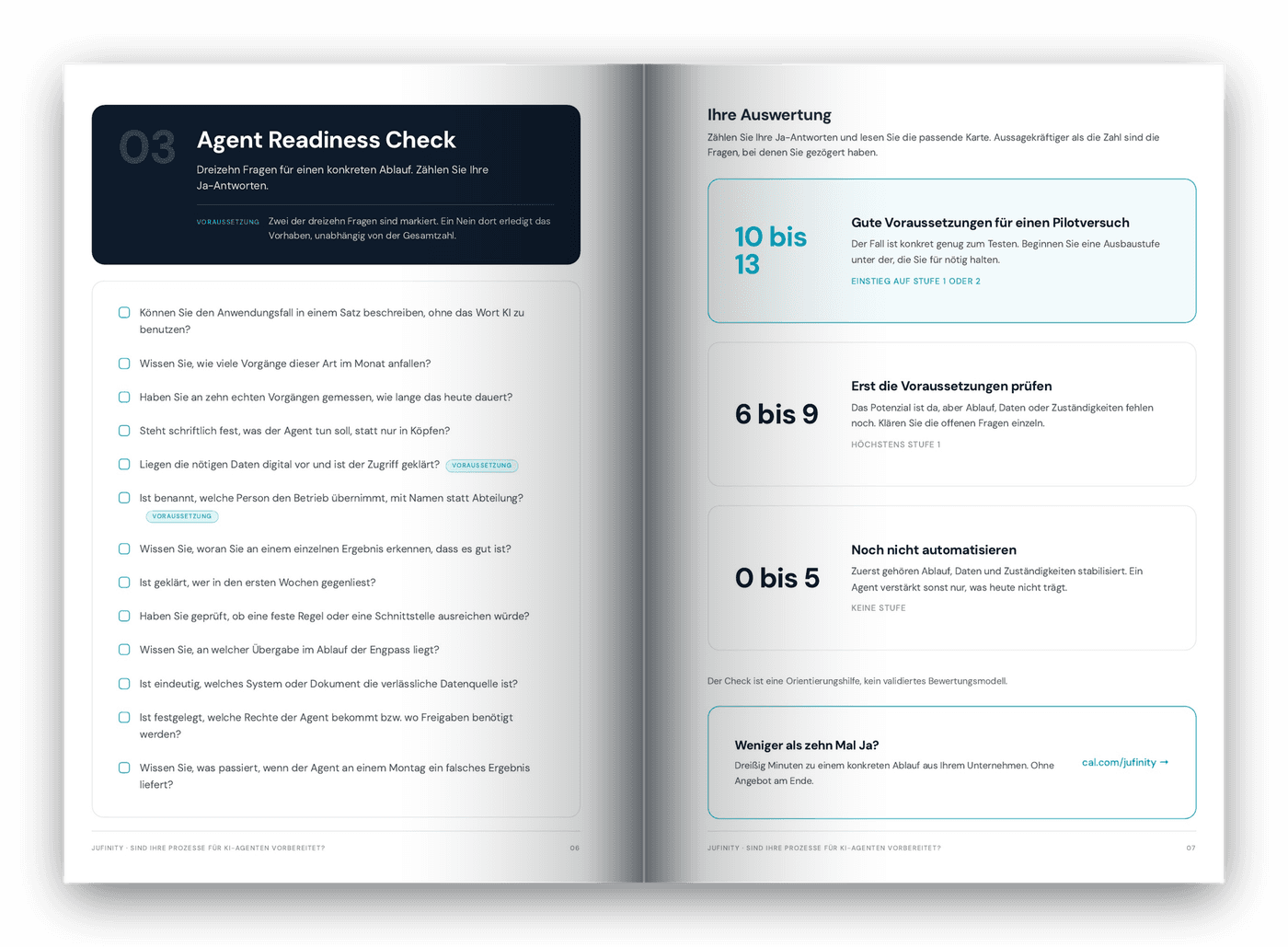
Thirteen questions, five levels of build-out and the decision of how many permissions an agent should get. The full whitepaper is here as a direct download, no form and no email address. It is written in German.
Live example
An agent is not a chat.
It is a chain with handovers.
Below, an inbox runs through: five typical messages from a supplier are read, classified, assessed and handed over to ERP, CRM and archiving. This is the flow I map out first in a real company, long before the question of tooling comes up.
Illustrative simulation: incoming emails are read, classified and assessed by language models and handed over to ERP, CRM and document systems. Steps that trigger something binding wait for human approval.
Inbox
Processing
Fields from prose and attachments
Case type with confidence
Priority, sentiment, deadline
Target systems
Enquiry. The draft quotation is with sales for review.
- 1ReadSender, Customer no. …
- 2ClassifyCase type with confidence
- 3AssessPriority, sentiment, deadline
- 4HandoverERPDraft quotation createdCRMActivity logged on contactArchiveDrawing 4471-B filed
The draft quotation is with sales for review.
Illustrative simulation. No connection to real systems, all details are invented and senders are anonymised.
Simulation: one inbox, three steps, three target systems. Click a message to run it on its own.
The chain in detail
Three steps, three handovers
Read
Prose, mail threads and attachments become fields: customer number, case type, quantity, date. This is exactly where a language model beats a fixed rule.
Classify
Enquiry, complaint, invoice, delivery notice, or something that should not be automated at all. With a confidence value you can use as a threshold.
Assess and hand over
Priority, sentiment and deadline decide the order. Only then do postings run into ERP, CRM and archiving, and anything binding waits for an approval.
The difference
Prompting or agent
Handing over the thinking
You ask a question, you get an answer, and you transfer it into your systems yourself. The error is visible immediately, because you read it.
Handing over the legwork
You set a goal. The system breaks down the path, reaches for tools and delivers something finished. The error looks plausible and surfaces late.
The same language model, a different division of labour. The difference is not in the technology but in what you hand over.Stefan Junge
What actually changes
An AI agent does not remove control. It moves it.
When prompting, you check as you go, because you see every intermediate step. With an agent that in-between disappears. Beforehand you set which data it may read, which actions need an approval and where it has to stop.
Afterwards you check with fixed test cases, spot checks in the first weeks and a log for every run. Whoever fails to organise that trade ends up without control, only with trust.
Setting expectations
Five levels of build-out
Cost, duration and expectation depend on the level, not on the tool. Most mid-market cases sit at two or three. Start one level below the one you think you need.
Template
A person starts every run. One result per request, run by that person, effort measured in hours.
Assignment
Multi-step work on request, finished files at the end. The department runs it, effort measured in days.
On schedule
The work runs on its own as planned, even when nobody is there. From here every agent needs a named person and a deputy.
Team solution
Several people work off the same state, changes are reversible. Run by IT or a technically minded specialist.
Built in
The agent is part of a product or process. Development and operations belong together, effort measured in months.
The most important decision
Only as many permissions as needed
Four levels of increasing weight. The further right, the heavier an error weighs and the stricter the control has to be. Expanding is always possible later, taking permissions back is considerably harder.
read
Review the result
Retrieve data from documents or systems. The agent changes nothing.
prepare
Approval before sending
Draft a quote, a report or an email without sending it.
change
Log and a way back
Update a record. From here an error reaches into your systems.
trigger
Binding approval
Send, order or create. Visible on the outside and rarely reversible.
Before the controlling department
Time is not the same as money
An agent takes hours off your team. How much of that reaches the books is a second question.
gained per month across the team, which only counts as a gain once it is spent on something else
of that reaching the books each month, because external services, overtime and rework go down
Example figures from a quoting process with 120 cases a month. The values are freely chosen and meant as a structure, not as a benchmark. Both are a gain, only one of them is visible to your controlling department.
Staying honest
When an agent does not help
- 01The rule is unambiguous and complete
- 02The task occurs rarely
- 03The result has to be right and nobody reviews it
- 04The data sits on paper or in people's heads
- 05The process is being rebuilt right now
- 06Nobody owns it
The first line only applies if the data is already in order. If the input arrives as prose, email or PDF, extracting it is precisely where an agent is strong. The simulation above shows both: four cases run through, the job application deliberately stays with a person.
Self-assessment
Four questions for today
Can you describe the use case in one sentence without using the word AI?
Have you measured across ten real cases how long it takes today?
Is a person named for running it, rather than a department?
Do you know what happens if the agent delivers a wrong result on a Monday?
These are four of thirteen questions. The full list and the scoring are in the whitepaper, and in a call we go through them against your process.
Common questions about AI agents
What is an AI agent?
An AI agent is given a goal rather than a question. It breaks down the path itself, reaches for data and tools along the way and delivers something finished, for example a draft quotation in the ERP. The same language model that answers in a chat here takes over the execution.
How does an AI agent differ from a chatbot?
With a chatbot you hand over the thinking and transfer the result into your systems yourself. With an agent you hand over the legwork. The decisive difference is that you no longer see the intermediate steps. Control moves from during the work to before and after it.
Which mid-market processes suit AI agents?
Workflows where the input arrives as prose, email or PDF, where the structure changes from case to case and where a person reviews the result anyway. A few examples: sorting the shared mailbox and opening cases, preparing enquiries for a quotation, matching incoming invoices against the purchase order, assigning delivery notices to goods receipt, recording and escalating complaints, filing test reports and certificates.
What does an AI agent cost?
That is not decided by the licence price of a tool but by the level of build-out. A template a person starts costs hours. An agent that runs on a schedule and serves several people costs ongoing operation and needs a named owner. That is why the level comes before any quote.
Which permissions should an AI agent get?
Concretely: start with read and prepare. The agent retrieves data and drafts documents, but sends and posts nothing. In the mailbox that means it reads the message, classifies it and creates the draft quotation, while sending and credit notes stay with a person. Change follows only once spot checks have been clean for several weeks, and trigger stays behind a binding approval for good. Expanding permissions is always possible later, taking them back is considerably harder.
What does the EU AI Act mean for AI agents?
That cannot be answered from the agent alone. What has to be examined is the whole workflow and the data it processes: which decision is made at the end, whom it affects, which personal data flows in, where it is processed and who has access. Only from that picture does it follow which obligations under the AI Act and the GDPR apply. To the legal notes →
How do I get started with AI agents?
Not with the tool but with the goal and the task. First settle what the result should be and how you will recognise a good one. Describe the task in one sentence without using the word AI. Then measure across ten real cases how long the workflow takes today and settle who will run it. With goal, task, measurement and a named person in place, a pilot is prepared. The thirteen questions in the whitepaper follow exactly that path.
Read on
If you want to go deeper
Your next step
One process. One clear next step.
Download the check and walk through it against a process of your own. If you want a second opinion afterwards: thirty minutes, no pitch deck, no sales call.